
12 (More) Blender Addons Everyone Should Use
Barely a day goes past without a new addon being released. It's awesome, but it's hard to keep up. So I've searched the community to find 12 of the best addons available today.
Last year we shared this list of free addons, but a year has passed and the Blender Market is booming. So in this post we'll look at both the best free and paid addons available...
1. Asset Flinger
What it does: Allows you to quickly and easily import your objects into other scenes.
Probably one of the coolest free addons that speeds your workflow. It works by adding a new toolshelf in Blender which lets you access your assets and easily import them to your scene just with a click. It's still a work in progress, and has a lot of features to be added in the future, but it's pretty awesome as-is!
- Price: Free!
- Author: Manu Jarvinen
- Download it
- How to Use it
2. RetopoFlow
What it does: Makes retopologizing a mesh, much, much faster and easier.
Probably the highest quality paid addon around. Created and supported by CGCookie, this addon is made for professionals.
This addon exists because when you sculpt something, you're not thinking about structure of your mesh. So the resulting mesh is ugly. But in order to apply textures, animate it or just make a clean render, you need to convert it into a cleaner mesh. Normally this involves a painful click-by-click method, but this addon makes it much, much easier. It's a toolset designed just for retopologizing something, and it's awesome at it.
- Price: $71.25
- Author: CG Cookie
- Buy it
- How to Use it
3. The Grove
What it does: Generates beautiful trees.
This works much like the Sapling Addon that comes with Blender, however, it has more improved features and a simplified interface for easier growing of trees. It's still constrained to Blender's operators which means you can't move, scale or rotate the tree until after you've finished editing all the parameters (kind of annoying). But it does as advertised, and makes great trees. It's the best tool for making trees in Blender, than anything else currently available.
- Price: $119.80
- Author: Wybren van Keulen
- Buy it
- How to Use it
4. EasyFX
What it does: Allows you to add compositing effects to your renders very quickly
If you're sick and tired of making complicated node setups just to do basic things in the compositor (like add a vignette) then this addon is for you. It gives you a plethora of the most-commonly used effects and adjustments right inside the Image Editor. The very nifty UI exposes the internal parameters that would be rather tedious to work with if you fiddled with it yourself.
- Price: Free!
- Author: Nils Söderman
- Download it
- How to Use it
5. Mirage
Allows you to: Easily create complex terrains
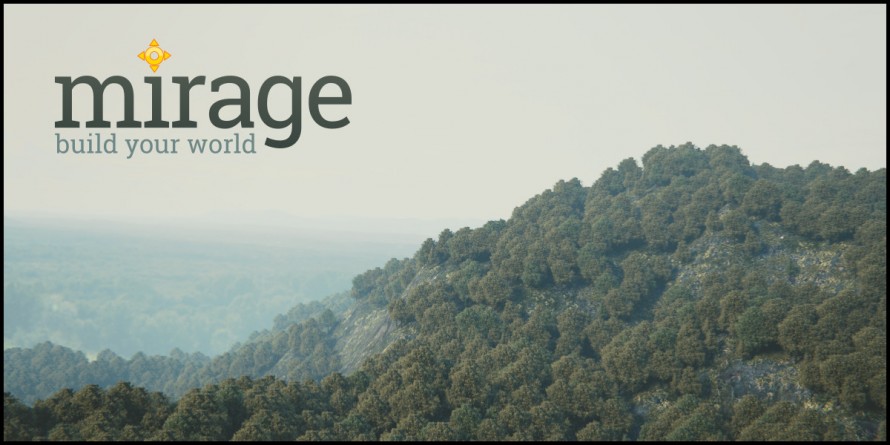
This is the ANT Landscape addon on steroids! If you're an environment artist tasked with making a largescale landscape, this will save you hours. It shines in it's easy-to-understand interface with helpful tools like showing you the vertex count of a terrain you're about to make before hitting that "Generate" button.
- Price: $25
- Author: Diego Gangl
- Buy it
- How to Use it
6. Matalogue
What it does: Gives you quick access to all the materials and lights in your scene.

Making complex scenes, means dealing with large amounts of materials, lights and compositing setups. This tool by Greg Zaal alleviates all these frustrations for you by giving you access to all this in one tab in the Node Editor.
- Price: Free!
- Author: Greg Zaal
- Download it
- How to Use it
7. Asset Sketcher
Allows you to: Quickly distribute your objects by "painting" them into your scene
Placing assets/objects manually in your scene can get pretty tiresome. But thankfully, this addon makes the job easier and more artist-friendly by utilizing a painting stroke approach to placing objects. It's as simple as clicking and dragging on your "canvas," (plus more tools). Awesome!
- Price: $29.95
- Author: Andreas Esau, Matthias Esau
- Buy it
- How to Use it
8. Animation Nodes
Allows you to: Animate almost anything in Blender!
This addon brings parametric modeling and animation to life! I've been wanting a feature much like Houdini where you can input node values and have them drive object properties. By default, this is possible through Blender via constraints and python coding--but this addon makes it intuitive and easy to use. It makes it easy to do mechanical rigs, motion design, and programming. It opens up a whole array of possibilities!
- Price: $0
- Author: Jacques Lucke
- Download it
- How to Use it
9. BakeTool
Hassle-free baking of textures for your scene
Remember the baking tutorial we did a few years ago? This addon makes the process and workflow easier, and much more manageable. It basically bakes all the shading and light information on your objects so you don't have to keep re-rendering all the frames of your animation. It works best in ArchiViz and games, and works for both Cycles and the Blender Internal renderer. So cool!
- Price: $14.95
- Author: Cogumelo Softworks
- Buy it
- How to Use it
10. BLAM Blender Camera Calibration Toolkit
Easily match the angle and perspective of a reference photo
This addon makes combining a render with a photograph a piece of cake. Using some clever programming, it accurately guesses the focal length and angle that the photo was taken with, so you can effortlessly put a render over the top :) We mentioned it one of our recent tutorials.
- Price: Free!
- Author: Per Gantelius
- Download it
- How to Use it
11. IK-Text Effects
Add special effects to any text in Blender
If you've ever envied the effortlessly results from tools like Adobe After Effects, this addon is for you. It's a powerful toolset for animating text in Blender.
- Price: $14.99
- Author: IK3D
- Buy it
- How to Use it
12. Gaffer - Light Manager
Take full control of all the lights in your scene
This addon makes your lighting workflow a whole lot easier! Lighting in Blender can be fun, but it can also be frustrating when you have too many lights to manually adjust, and begin to lose track of which does what. Using this addon will alleviate those problems. It gives you control over your scene's lighting setup from a single panel, tweaking settings without needing to find and select each light one by one. A must have for big scenes!
- Price: $17.95
- Author: Greg Zaal
- Buy it
- How to Use it
Special Mention: Pro Lighting: Skies
Allows you to: Quickly and easily add realistic outdoor lighting to your scenes
Disclaimer: We made this, so we're biased.
Outdoor lighting is more complex than just a sun lamp, so we created this addon to give you real world lighting inside Blender. It works by using real skies that were captured in HDR, and feeds it in Blender, providing both accurate lighting and reflections across the entire scene.
It comes with 80 HDR skies, that you can cycle through effortlessly:
You can even try the demo before you buy. I used it myself in this scene.
- Price: $97 - $197
- Author: Blender Guru
- Buy it: http://www.blenderguru.com/product/pro-lighting-skies/
- How to Use it: http://www.blenderguru.com/install-pro-lighting-skies/
Do you have your favorite addons that aren’t on the list? Post in the comments below!